

Cummins INLINE 7 Adapter Review: Best Tool for Insite 8.7

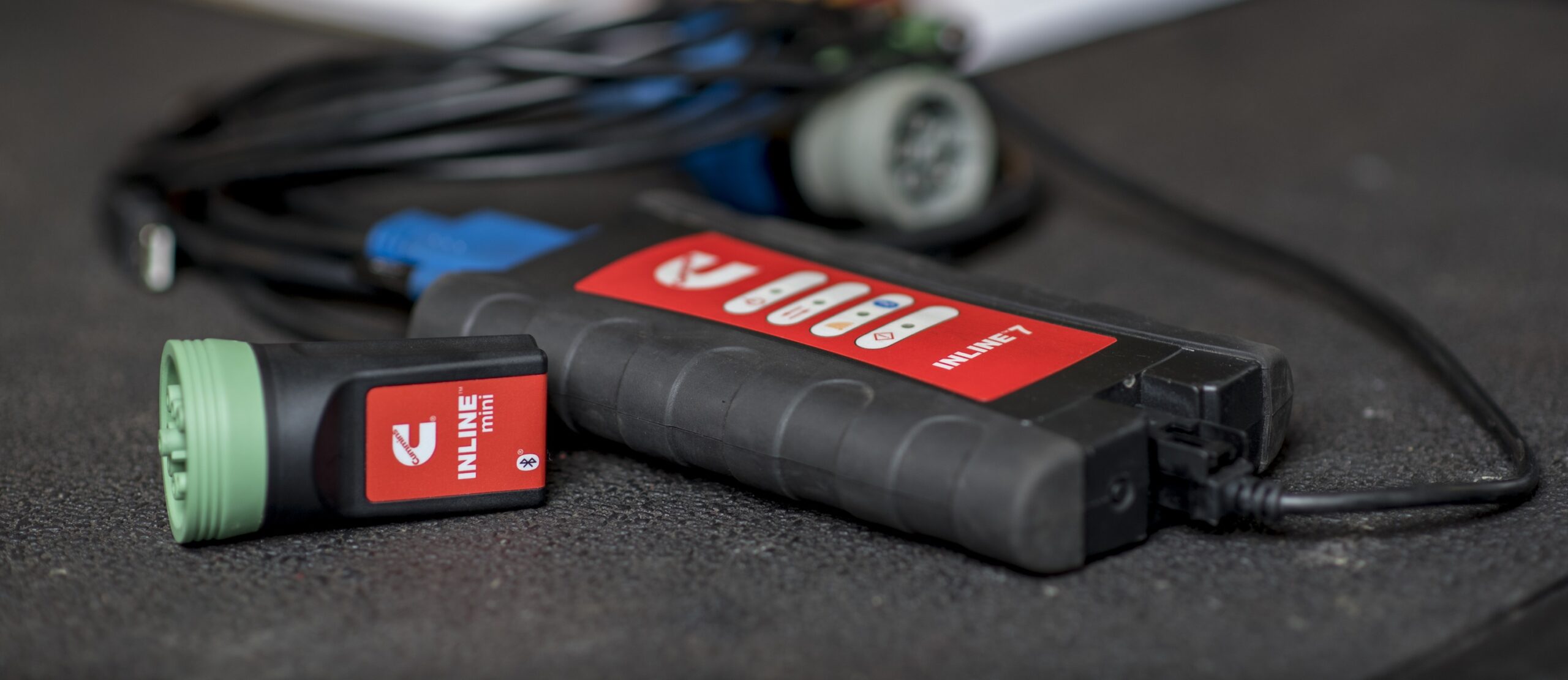
Overview: Cummins INLINE 7 Data Link Adapter
If you're a diesel technician, fleet manager, or Cummins truck owner, having the right diagnostic tool is crucial. The Cummins INLINE 7 Adapter is the ultimate professional-grade solution designed to work seamlessly with Cummins Insite software, offering USB, WiFi, and Bluetooth connectivity for fast, reliable engine diagnostics.

In this in-depth review, we'll cover:
- ✔ Why the INLINE 7 is the best Cummins diagnostic adapter
- ✔ Key features & real-world performance
- ✔ Compatibility with Cummins Insite & RP1210 software
- ✔ How it compares to other adapters (NEXIQ, JPRO, etc.)
- ✔ Step-by-step setup & usage guide
By the end, you'll know if this is the right Cummins diagnostic tool for your needs.
In Stock • Free US Shipping
Cummins INLINE 7 Diagnostic Adapter
High-speed RP1210 adapter with USB, WiFi, and Bluetooth support for Cummins Insite.
🔍 What Is the Cummins INLINE 7 Adapter?
The Cummins INLINE 7 Adapter is a high-performance diagnostic interface designed for Cummins engines, including ISX, ISB, ISL, and QSK series. It connects to Cummins Insite software and provides:
- ✅ Full engine diagnostics (fault codes, live data, parameter adjustments)
- ✅ USB, WiFi, and Bluetooth connectivity (flexible usage)
- ✅ RP1210 compliance (works with third-party software like Detroit Diesel & CAT)
- ✅ Faster processing & larger memory than older INLINE models
💡 Why Choose the INLINE 7 Over Other Adapters?
| Feature | Cummins INLINE 7 | Generic OBD2 Adapters | NEXIQ USB-Link 2 |
|---|---|---|---|
| Cummins Insite Support | ✅ Full | ❌ No | ✅ Limited |
| Connection Options | USB + WiFi + Bluetooth | USB Only | USB Only |
| Multi-Brand Compatibility | ✅ Detroit, CAT, Volvo | ❌ No | ✅ Yes |
| Speed & Performance | ✅ Fastest | ❌ Slow | ✅ Fast |
| Price | Mid-Range | Cheap | Expensive |
Verdict: The INLINE 7 is the best balance of price, performance, and compatibility for Cummins diagnostics.
Key Features of the Cummins INLINE 7 Adapter
1. Full Cummins Insite Compatibility

- Read & clear fault codes
- Monitor live engine data (RPM, fuel pressure, DPF status)
- Perform parameter adjustments & calibrations
2. Triple Connection Modes (USB, WiFi, Bluetooth)

- USB for stable wired connections in shop bays
- WiFi/Bluetooth for wireless diagnostics around the vehicle
3. Multi-Platform Support
Works with:
- Detroit Diesel (DDDL)
- CAT ET & Volvo PTT
- JPRO & other RP1210-compliant software
Who Should Buy the Cummins INLINE 7 Adapter?

- ✔ Diesel Technicians & Mechanics: Full Cummins Insite support for advanced diagnostics with fast live data streaming.
- ✔ Fleet Managers: Diagnose multiple truck makes (Cummins, Detroit, CAT) with a single reliable interface.
- ✔ Commercial Truck Owners: Troubleshoot engine check codes independently before expensive shop downtime.
How to Use the Cummins INLINE 7 Adapter

Step 1: Install Cummins Insite Drivers
Install the INLINE 7 driver package on your Windows laptop.
Step 2: Connect the Adapter
Connect the 9-pin Deutsch or OBD2 connector to the truck's diagnostic port and link via USB, WiFi, or Bluetooth.
Step 3: Launch Diagnostic Software
Select "INLINE 7 RP1210" in the device connection settings.
Step 4: Read Fault Codes & Live Data
View active and inactive faults, run cylinder cutout tests, and monitor aftertreatment DPF regeneration.
Vehicle & Software Compatibility
Supported Cummins Engines: ISX15, X15, ISB6.7, ISC, ISL, QSK19, QSK60, and industrial engines.
Works With: Cummins Insite, Detroit Diesel Diagnostic Link (DDDL), Caterpillar ET, Eaton ServiceRanger, and Volvo PTT.
Final Verdict
The Cummins INLINE 7 Adapter is an essential tool for commercial diesel diagnostics, combining rugged hardware, flexible wireless connectivity, and comprehensive RP1210 software support.
✔️ 30-Day Guarantee | ✔️ Free Technical Support | ✔️ Authentic Diagnostic Interface

One thought on “Cummins INLINE 7 Adapter Review: Best Tool for Insite 8.7”